· Learnings · 7 min read
Building a Localized, Password-Gated Evite in Astro
Free invitation services trade convenience for control over guest data. I built a translated, personalized, scroll-animated evite on my own site and documented where its protections stop.
I needed to send an evite, and a free invitation service seemed like the obvious place to start. Still, uploading a guest list gave me pause. After I read a thread on r/Scams about a Punchbowl-related scam , I knew I would feel better with tighter control over what I sent and where the replies went.
Sea Otter Studio already ran on Astro, which gave me another option: I could build the invitation myself. I would own the guest experience and the path the RSVP data took, but I would also own every defect in both. For a small, personal event, that felt like a reasonable trade.
Requirements
The guest list set the constraints. It spanned a wide range of ages, not everyone read the same language, and some guests would only want the date and location. Before designing anything, I wrote down what the page needed to do:
A simple interface suitable for a wide audience.
A visual treatment that feels like an occasion.
The date and location visible without interaction.
An access gate with no more complexity than the page itself.
A complete translation for each language I needed to send.
The page had to be readable at a glance, and any extra polish had to support that goal rather than compete with it. That priority gave the page a simple order: show the essential information first, add a moment of visual interest, and then ask for a response.
Structure: Card, Cake, RSVP
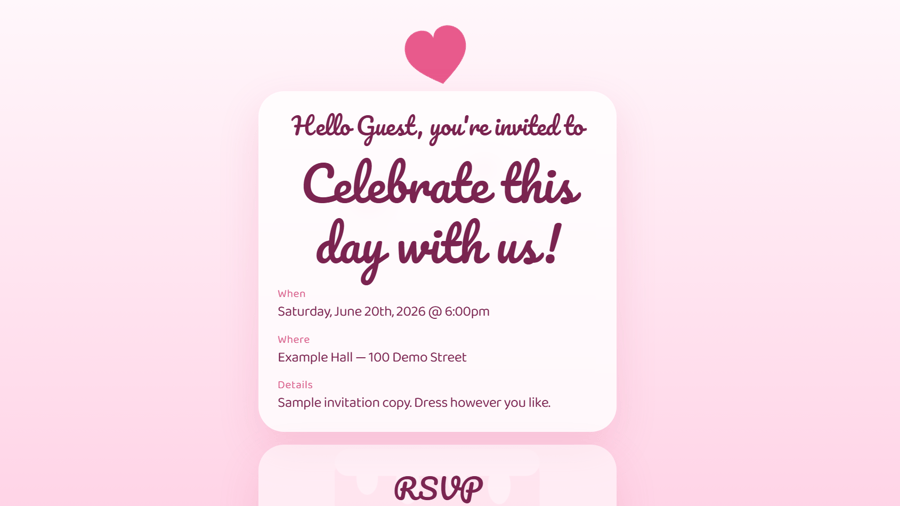
That order became a three-part structure: a card with the greeting and event details, an animated cake, and the RSVP form.
The card occupies the first viewport and shows the date, location, and a short note. Behind it, an inline SVG cake builds from the plate up to the candle as the guest scrolls toward the form. Each layer is driven by the root scroll timeline:
animation: evite-layer linear both;
  animation-timeline: scroll(root block);
}
Each layer sets its own animation-range, so the plate, tiers, decorations, and candle appear in sequence. The flame is the exception: it runs a short keyframe loop independent of scroll position, which keeps the finished cake from looking static.
Once the cake is complete, a separate view timeline tied to the RSVP section moves it as the form scrolls into view. A small ResizeObserver measures the candle and writes the offset to a CSS custom property, so the movement adapts to the viewport instead of relying on a fixed distance.
Tuning the scroll distance took more iterations than drawing the SVG. If the effect took too long, it competed with the invitation. If it completed too quickly, it was barely noticeable. I adjusted the ranges until the cake had enough time to form without making the RSVP harder to reach.
Because the page still needed to work without that movement, I treated the animation as progressive enhancement. Where animation-timeline is unsupported, the layers render fully visible. Under prefers-reduced-motion: reduce, the animations are disabled, the layers remain visible, the decorative falling heart is hidden, and the flame does not flicker. The event details, form, and gate behave the same in every case.
Treating a Locale as a Complete Configuration
The first architectural lesson came from localization: translating the initial headings was easy, but keeping two versions complete would be harder if the strings had no clear owner. I did not want headings in one component, form labels in another, and validation messages in client-side code. I wanted one place where I could tell whether a locale was ready.
I made each language a complete, typed configuration. The example invitation defines English and Traditional Chinese:
font: 'latin',
  subheading: "{name}, you're invited to",
  heading: 'An example celebration!',
},
zh: {
  font: 'cjk',
  subheading: '{name},誠摯邀請您!',
  heading: '一場示例慶祝!',
},
That boundary became useful beyond translation. The font value lets each locale select suitable typography without putting font-specific logic in the page. I installed the open-source font packages through npm from
Fontsource
and mapped each locale to the appropriate set. The same object owns the password prompt, validation errors, RSVP buttons, and saved-response messages. A locale is therefore either complete in one place or visibly missing something.
That separation also simplified routing. The page calls getStaticPaths over the configuration keys, so adding a language creates another static route without adding conditions to the layout. A new event gets its own copy file and page, but it can keep the shared Evite component. The lesson was not simply to move strings into an object; it was to give content a boundary that the rest of the implementation could depend on.
With the content boundary settled, I had to be equally clear about a different boundary: access.
A Gate Is Not Authorization
The invitation opens on a single password field. A correct entry sets a flag in sessionStorage, which keeps the page open for the rest of the browser session, and the route uses noindex, nofollow to ask search engines to skip it.
Building that flow made the distinction between privacy and security explicit. The password and invitation content are both delivered to the client, so someone who inspects the page can bypass the check. noindex also influences only well-behaved crawlers. I kept the gate because a small amount of friction matched the needs of this invitation, not because it protected the content. Anything sensitive would require server-side validation before the response was sent.
That distinction between protection and convenience carried into the RSVP flow as well.
Separating Submission from Remembered State
The RSVP is the part that needs to leave the browser. After checking the form fields and confirming that a reCAPTCHA response is present, the page submits the RSVP values to Web3Forms. Only after that request succeeds does it store a copy of the response in localStorage.
The stored copy is not the RSVP record. It is a convenience for the guest: on the next visit, the page can show the saved reservation and restore the values if they choose to change it. Keeping those roles separate made the limitation easier to evaluate. The submission goes to Web3Forms, while the remembered interface remains local to one device.
I accepted that per-device behavior because most guests would likely revisit the invitation on the same device they used to respond. If they opened it elsewhere, the date and location would still be waiting at the top. I did not need more infrastructure to reproduce every detail of their previous visit; I needed the important information to remain easy to reach.
Personalization
The page needed one more personal detail. To address guests by name without adding a database, it reads an optional name query parameter and substitutes the value into the locale's subheading template:
/evite/en/example/?name=JoeThe card then reads "Joe, you're invited to," and the document title updates to match. Before rendering through textContent, the input is trimmed, repeated whitespace is collapsed, its length is limited to 60 characters, and each word except "and" is capitalized. Without the parameter, the generic greeting remains.
You can try the
example invitation
with the password evite. The
Traditional Chinese version
follows the same path through the shared component with its own copy.
Final Thoughts
I kept the card-cake-form structure, the locale-keyed copy files, and the single-field gate. The animation earns its place because the event details remain readable without it, and the gate is appropriate only because its limits match the modest privacy needs of the invitation.
The copy-file approach is the part I expect to reuse most. Treating a locale as one complete, typed set of strings removes conditionals from the templates, and a new event becomes a content change instead of a redesign.
More importantly, the finished page feels personal without asking guests to learn a new interface. The cake brings a little warmth to the experience, but the date, place, and response are still easy to find. That balance is what I hoped for when I decided to build the invitation myself, and it is the lesson I will carry into the next small feature: keep the structure simple, add delight carefully, and be honest about the boundary of every technical choice.